SAP Business One® e-mail and Microsoft’s SMTP AUTH change: are you affected?
Last checked: 10 October 2026. We checked the SAP Business One client screens on our own test system (10.0 FP 2608). The Job Service page and the Microsoft 365 side come from SAP’s and Microsoft’s documentation; we have not tested them. Microsoft has moved these dates before, so check its announcement before you plan. The Mailer steps apply to SAP Business One 10.0 FP 2508 and later; older versions may show different screens.
If your SAP Business One sends alerts, approval notices or scheduled reports by e-mail through Microsoft 365 with a user name and password, that e-mail may stop at the end of December 2026 unless your Microsoft 365 admin acts.
What Microsoft is changing
Microsoft announced (published 27 January 2026) that for Exchange Online:
| When | What happens |
|---|---|
| Until December 2026 | No change |
| End of December 2026 | Basic authentication for SMTP AUTH is turned off by default for existing tenants. Microsoft says admins will still be able to turn it back on, but has not yet said how |
| After December 2026 | New tenants created after December 2026 get OAuth only by default |
| Second half of 2027 | Microsoft will announce the final date when Basic SMTP AUTH is removed |
Two things catch people out:
- App passwords are Basic authentication too. They stop with it.
- Some companies are already affected today. If your tenant uses security defaults, or SMTP AUTH is turned off for the organization and not switched back on for the sending mailbox, SMTP sending with a password is already blocked.
Which SAP Business One e-mail is affected
- The SBO Mailer, if it sends through
smtp.office365.comwith Basic Authentication. The Mailer sends alerts, approval notifications and scheduled reports by e-mail. - Boyum Print & Delivery, if an e-mail action uses its SMTP method to
smtp.office365.comwith a user name and password.
We don’t expect these to be affected, because as far as we know they don’t sign in to SMTP with a password: sending from Outlook on the user’s PC (connected to Microsoft 365 as a normal account, not POP or IMAP), and SAP’s Microsoft 365 integration. Any other add-on or integration that sends to smtp.office365.com with a user name and password is affected in the same way.
The quick check
- In SAP Business One, go to Administration > System Initialization > General Settings, Services tab. If Enable Mailer Service is not selected, the SBO Mailer is not switched on for this company. Check each company you use. (Print & Delivery in step 4 can still be affected.) If Enable Company Specific Mailer Configuration is selected, this company’s SMTP settings are on this same tab (SMTP Server, Authentication, User Name, Client ID, Client Secret): check them as in step 2 (here the field is called Authentication).
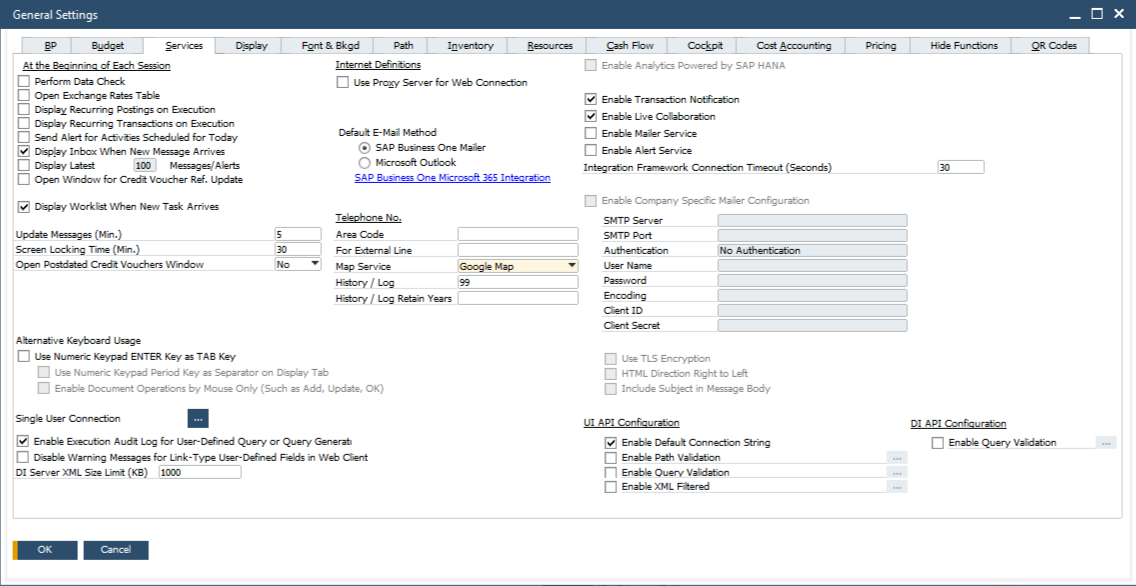
General Settings, Services tab, on our test company: Enable Mailer Service and the company-specific Mailer settings. - Open the Job Service page:
https://<your server>:<port>/job(or the Job Service link on the Services tab of the System Landscape Directory), and sign in as the landscape administrator,B1SiteUser(the address is case-sensitive). On the Mailer Settings tab, if SMTP Server issmtp.office365.comand Authentication Type is Basic Authentication, you are affected. On versions before FP 2508 the Mailer settings may be in a different place and have no Authentication Type field: a user name and password forsmtp.office365.commeans Basic Authentication. - In SAP Business One, Help > About SAP Business One: note the version and its Feature Pack (FP) or Support Package (SP) number. 10.0 FP 2508 or later can switch the Mailer to OAuth. Older versions need an upgrade or another route.
- If you use Boyum B1 Usability Package: check each Print & Delivery e-mail action’s delivery method, on both the Client and the Server side. SMTP, or Exchange against Microsoft 365, means it needs attention.
- Your Microsoft 365 admin can see whether SMTP AUTH is on for the sending mailbox and for the organization (Microsoft’s page “Enable or disable SMTP AUTH in Exchange Online”). SMTP AUTH can be on for the whole organization or switched on for one mailbox (Microsoft 365 admin center > Active users > Mail > Manage email apps > Authenticated SMTP).
How to fix it
If you are on 10.0 FP 2508 or later: switch the Mailer to OAuth 2.0. SAP’s Administrator’s Guide describes these steps:
- In the Azure portal, under Microsoft Entra ID > App registrations, register a new app. Note the Application (client) ID and the Directory (tenant) ID.
- Add a client secret and note its value and its expiry date.
- Under API permissions, choose Add a permission > APIs my organization uses > Office 365 Exchange Online > Application permissions > SMTP.SendAsApp, then Grant admin consent.
- On the app’s Overview, open the Managed application in local directory link and note its Object ID (not the app registration’s Object ID).
- In Exchange Online PowerShell, register the app’s service principal and give it access to the sending mailbox with full access (
New-ServicePrincipal, thenAdd-MailboxPermission), as SAP’s guide and Microsoft’s OAuth page show. - On the Job Service page choose Stop. On the Mailer Settings tab set Authentication Type to OAuth 2.0 for Microsoft 365, enter as User Name the same mailbox you used in step 5, and fill in Client ID and Client Secret. Choose Save, then Start (status RUNNING). If a company uses Enable Company Specific Mailer Configuration (quick check, step 1), make the same change in that company’s fields on the General Settings Services tab, not only on the Job Service page.
Two details from SAP’s guide: the sending mailbox needs an Exchange Online license, and SMTP AUTH must be enabled for that mailbox, even with OAuth. Microsoft’s December change turns off Basic sign-in, not SMTP AUTH itself. If SMTP AUTH is off for your organization, your admin can switch it on for this one mailbox. If your tenant uses security defaults, SMTP AUTH stays blocked even for one mailbox. The only way to open it is to turn security defaults off, and Microsoft says to put Conditional Access policies in place straight away (they need Microsoft Entra ID P1), because security defaults also enforce multifactor sign-in. That is a security decision for your admin; one of the other routes below may suit you better. If e-mails should go out from another address (for example sales@), that mailbox must grant Send As to the Mailer’s mailbox.
When the client secret expires, the Mailer can no longer sign in, so put its expiry date in your calendar.
If you are on a version older than FP 2508: the Mailer has no OAuth option. Plan the upgrade, or use another route below.
Other routes Microsoft offers:
- SMTP relay through a connector to your domain’s Microsoft 365 MX endpoint on port 25. It needs a static public IP that is yours alone, or a certificate, and Microsoft says it can’t be used from apps hosted by a third party, such as Azure. So it does not suit SAP Business One at a hosting provider or on an Azure server.
- Azure Communication Services Email: Microsoft’s option for sending to internal and external recipients.
- Another SMTP service. The Mailer can send through any SMTP server it can reach, with a user name and password or anonymously.
Direct Send and High Volume Email reach internal recipients only, so they don’t suit customer documents.
Boyum Print & Delivery: its Graph API method avoids SMTP AUTH. It needs B1 Usability Package and its Server Component 2026.06 HF08 or later. See our guide Boyum Print & Delivery e-mail and Microsoft’s EWS switch-off for the check.
What it is not
If SAP Business One shows message 3581-4 when a user sends, that user has no e-mail address on the General tab of their user setup. That’s a different cause with a different fix.
Quick answers
Can our admin just turn Basic back on in January?
Microsoft says admins will be able to, but hasn’t said how yet, and a final removal date will follow in 2027. Use it as a short bridge, not the fix.
Does this affect e-mails users send from Outlook?
No, as long as Outlook connects to Microsoft 365 the normal way, not as a POP or IMAP account. This change is about apps and devices that sign in to SMTP with a password.
Will the error message tell us what happened?
There may be no clear error in SAP Business One. Check the Mailer status on the Job Service page, then send a test e-mail and check the sent messages in SAP Business One.
If you’d rather not set this up alone, send us what you see and we’ll walk through it with you.
SAP and SAP Business One are the trademarks or registered trademarks of SAP SE or its affiliates in Germany and in other countries. Microsoft, Microsoft 365, Exchange Online, Microsoft Entra and Azure are trademarks of the Microsoft group of companies. Boyum and B1 Usability Package are trademarks of Boyum IT. Product names are trademarks of their owners. ZConsulto’s services are not produced or endorsed by SAP or by any other vendor named on this page.
Screenshot from our SAP Business One test company (demo data): © 2026 SAP SE or an SAP affiliate company. All rights reserved.